Built for Windows 10 and 11 · 64-bit

Slap Battles Macro
Bind to hotkey.

Record your glove ability sequence and slap timing once, then replay it on F10 from anywhere in the game. The macro captures every click and keystroke at the input level, so it works even in fullscreen Roblox matches without triggering detection systems. Save your routine to a file and load it again next session—no reconfiguration needed.

No telemetryFully free, alwaysOffline, no account neededv1.0.0
Record glove combosReplay on hotkeyFullscreen gamesSave and reuseAdjustable speed
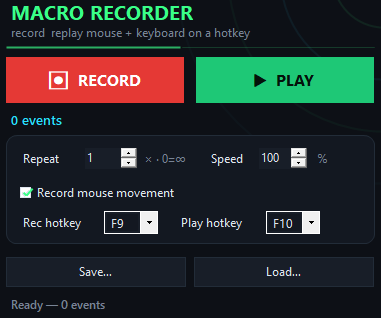
Slap Battles Macro app window on Windows
Real-world results
Inside the appSlap Battles Macro window

Your Slap Battles routine runs the same way every time.

A good macro captures the exact timing of your slap sequence—the pause between glove swaps, the click rhythm, the positioning adjustments. When you replay it, each repetition lands identically, so farming or practicing a pattern becomes consistent instead of manual.

Glove ability chainsRecord the full combo from your first glove activate through the final slap, including wait times between actions.
Timing precisionReplay respects the exact millisecond delays you captured, so frame-tight sequences stay frame-tight.
One file, many runsSave your routine as a file and load it weeks later—the macro plays identically without rerecording.
Why macros work

Why record instead of clicking manually every round.

A macro removes the repetition, locks in your timing, and lets you focus on reading your opponent instead of executing the same buttons.

Quick setup

Set up your Slap Battles macro in four steps.

Recording takes under a minute; replaying takes one hotkey press.

1
Launch and press F9Open Slap Battles Macro, stand in the game lobby or arena, then press F9 to start recording.
2
Execute your comboPerform your glove ability sequence—switch gloves, click to slap, wait, repeat—exactly as you want it to play back. Press F9 again when done.
3
Test and tune speedPress F10 to replay. If the pace needs adjustment, move the speed slider left to slow down or right to speed up, then press F10 again.
4
Save for laterGo to File > Save and name your routine. Next time you play, open File > Load, pick your saved routine, and press F10 to run it.
Macro vs manual

How Slap Battles Macro compares to clicking manually.

Manual clicking is inconsistent and tiring; a macro is repeatable and hands-off.

Slap Battles Macro

  • Timing drift — Locked in place
  • Repetition fatigue — Press F10 once
  • Sequence mistakes — Never missed
  • Speed adjustment — Slider before replay
  • Reuse next session — Load the file
  • Works fullscreen — Hardware-level input

Manual clicking

  • Timing drift — Varies each round
  • Repetition fatigue — Click dozens of times
  • Sequence mistakes — Happens mid-combo
  • Speed adjustment — Re-record entirely
  • Reuse next session — Do it from scratch
  • Works fullscreen — Depends on game focus
Your questions answered

Common questions about the macro.

Will the game detect this as a bot?

Slap Battles Macro sends standard keyboard and mouse input, not code injection or memory manipulation. The game receives the same signals as if you clicked manually. Whether a game allows macros is up to its own rules, which you should check.

Can I bind the hotkey to a different key?

Yes. The app starts with F9 to record and F10 to replay, but you can rebind both to any key through the settings.

What if my combo has waits and pauses?

The macro captures every delay you include. If you pause for half a second between glove swaps, that pause is saved and replayed identically.

Can I save multiple routines?

Yes. Each routine is a separate file. Save your current combo as 'combo_1', record a different sequence, save it as 'combo_2', then load whichever one you need.

Does it work if I change screen resolution?

The macro records your clicks and keystrokes, not cursor coordinates, so resolution changes do not break it. Only pure cursor movement is position-based.

Can I run the same macro multiple times in a row?

Yes. Set the loop count to repeat the routine once, a specific number of times, or indefinitely until you press a stop key.

Is there a file size limit or storage limit?

No. Routines are stored as ordinary files on your disk, so they are limited only by your drive space.
Download Slap Battles Macro and record your first routine today.

Your glove combo is ready to go—capture it now, replay it forever.

Download for Windows
Latest release · v1.0.0

Slap Battles Macro guides